
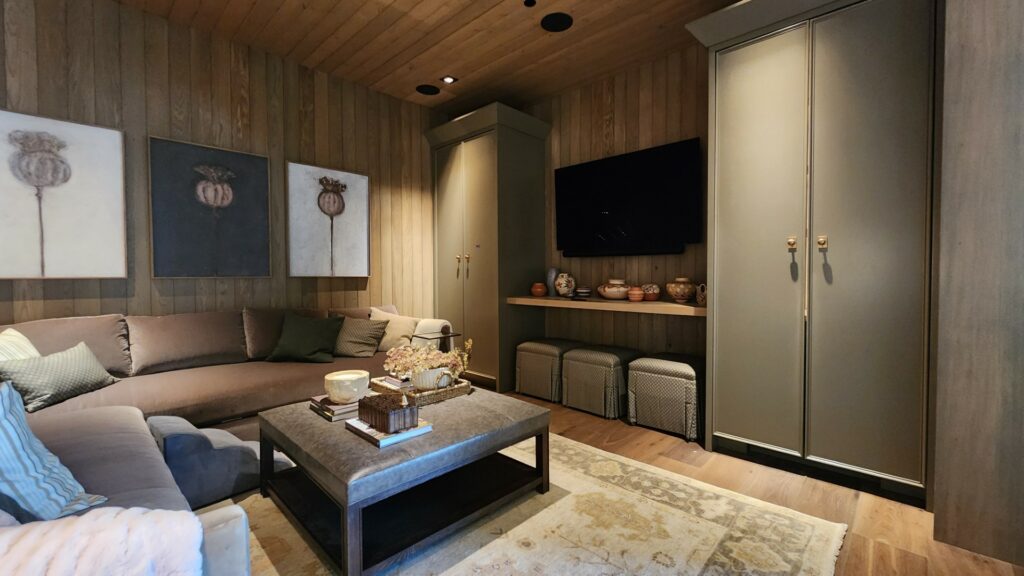
Most media rooms juggle a lot: a Saturday game with the lights on, background music during dinner, and a movie after dark. When your TV, audio, lighting, and remotes are pieced together separately, the room shows it.
Stabley Home Entertainment Specialists help East Valley homeowners choose the equipment, coordinate the sale and installation, and put display, sound, seating, lighting, controls, wiring, and network on one plan. The result should be simple: pick an activity, and the room is ready to use.
What Makes A Media Room Different From A Dedicated Home Theater?
A dedicated home theater is built for focused viewing. It usually has controlled light, theater-style seating, and a design centered on movie nights. A media room is more flexible. It may be a family room, loft, bonus room, or open living area that needs to handle sports, TV, movies, music, and conversation.
That flexibility changes the equipment plan. A media room often needs a bright display that performs with daylight, audio that stays clear without taking over the room, and controls that do not require a pile of remotes. If you are deciding between a media room and a dedicated theater, Stabley can help you compare the room, your viewing habits, and the options before equipment is purchased.
Plan Around The Seats, Windows, And Screen
Start with the seats, windows, and wall that will carry the screen. Measure the main viewing distance, note the light in the room when you actually use it, and look at ceiling height, wall space, and nearby surfaces that reflect sound. Those details narrow the right display and speaker choices before anyone starts comparing model numbers.
Designing For Arizona’s Bright, Open Floor Plans
From Mesa and Gilbert to Scottsdale and Chandler, East Valley homes are built around big windows, open great rooms, and strong afternoon sun, and that is exactly where local design experience pays off. A display that looks excellent in a dark showroom can struggle when afternoon light reaches the screen. That does not mean every media room needs blackout shades. It means the display, its placement, and the lighting plan should be chosen together.
Account for daylight before choosing your display. A high-brightness TV is usually the best fit for a room with uncovered windows. A projector can still work when the room has a practical plan for screen placement and ambient light. Motorized shades are not just decorative in this setting: Lutron notes that automated shades can reduce glare and solar heat gain. See Lutron’s home-theater shading guidance.
Buy Media Room Equipment As A System
Stabley’s equipment-sales process starts with the room, not a list of disconnected products. A TV or projector, sound system, receiver, remote, and network have to work together on day one. We can help homeowners compare options, decide which equipment can stay, and choose new components that fit the layout, viewing habits, décor, and budget. Buying pieces one at a time often creates a later problem with controls, wiring, or placement.
Why Buy Through An Integrator Instead Of A Big-Box Store?
You can pick up a TV at a big-box store on the way home, but that is where the easy part ends. Getting it to work smoothly with a receiver, speakers, streaming devices, lighting, and one simple remote is where most DIY projects stall. When you buy through an integrator like Stabley, we check compatibility before anything is ordered, install and program the equipment as one system, and give you a single point of contact for warranty questions, returns, and service. If something stops working, you call one local team instead of five different manufacturers.
It also means you are working with people who use this equipment every day. We often pair Sony or Samsung displays with Klipsch or Sonance speakers, a Denon, Marantz, or Yamaha receiver, Sonos for easy music streaming, and Lutron lighting and shade control, choosing each piece for how it fits the room rather than for the biggest spec sheet.
Tired of dealing with five different remotes and tangled wires?
Get a unified system designed for your home, from the display and sound to the lighting and controls.
Choose A Display That Fits The Viewing Distance And Light
For many media rooms, a wall-mounted TV is the practical center of the system. It turns on quickly, works well in brighter spaces, and can be paired with a soundbar or surround-sound system. The size should feel comfortable from the main seats without forcing viewers to turn their heads from side to side.
A projector can be a great choice when the room supports it. It needs thoughtful screen placement, control of ambient light, and a plan for where the projector and cabling will live. If a media room is also used during the day, a TV may be the stronger everyday option while a projector makes more sense in a darker, dedicated theater. Our custom home theater planning guide covers the larger room decisions that come with a theater-focused space.
Build Sound Around The Room And The People In It
Sound is often the difference between a room that looks finished and one people keep coming back to. A soundbar can improve dialogue for a straightforward TV setup. A surround-sound system gives movies, sports, and games a fuller sense of space. The right choice depends on the room layout, the seating position, ceiling construction, and how visible you want the speakers to be.
Speaker placement should follow the listening area, not simply the nearest convenient wall. In-ceiling, in-wall, bookshelf, and freestanding speakers can all work in the right plan. Stabley can also design home audio that lets music continue into other rooms without making every speaker play the same thing.
Open rooms with tile, glass, and high ceilings can make dialogue less clear than expected. Speaker position and calibration matter as much as speaker count. Dolby recommends placing the center speaker near the screen for dialogue, positioning surround speakers beside or behind the listener, and using room calibration to tune the system to the space. Read Dolby’s speaker-setup guidance.
Plan The Wiring And Network Before The Room Is Finished
Clean installation is not just about hiding wires after the fact. It means planning power, signal cables, receiver locations, internet coverage, and future access before furniture, drywall, or built-ins make those decisions harder. A hardwired connection can be especially useful for a fixed TV, streaming device, receiver, or gaming system when the room is far from the router.
It is also worth leaving a path for future changes. Streaming devices, game consoles, cable boxes, and displays change over time. Accessible equipment space and labeled wiring make service and upgrades less disruptive later.
Make Controls Simple Enough To Use
Your guests shouldn’t have to ask which remote controls the volume, which changes the input, and which turns on the TV. A properly programmed control can combine those steps into one activity: Watch TV, Movie Night, Music, or Game Time.
That is where home automation earns its place. A single command can turn on the display and sound system, set the right input, lower shades, and adjust lights. The system should still be easy for the people who do not want to use voice control or an app. A dedicated remote or keypad is often the right answer.
Use Lighting To Support The Screen
Lighting should help people move around the room without washing out the image. In a TV-based media room, dimmable lamps, recessed lights, and wall sconces can be grouped into scenes. For a projector, lights behind or beside the seating area are usually more useful than a bright fixture aimed at the screen.
Scenes are more useful than one all-purpose dimmer setting. A “Watch” scene can lower the room while preserving a safe path to the door. A “Pause” scene can bring lights up for a conversation. Learn more in our guide to lighting control with home automation.
How To Budget For A Media Room
Every room is different, so there is no single price that fits every project. It helps to think in three levels, then decide where your room fits and what you want to add over time.
- Essential setup. A quality wall-mounted TV, a soundbar with a subwoofer, clean wire management, and one easy remote. This is the right fit for a family room that needs a simple, reliable upgrade.
- Enhanced media room. A larger or higher-brightness display, a receiver with surround sound or in-wall and in-ceiling speakers, dedicated streaming devices, and a few lighting scenes for movies and games.
- Fully automated premium room. A flagship display or projector and screen, immersive surround sound, motorized shades, lighting control, hidden equipment in a rack or closet, and one-touch control for every activity.
The biggest cost drivers are the display size and type, how many speakers are built into walls and ceilings, how much wiring has to be run, and whether lighting and shades are part of the plan. Reusing equipment you already own and planning wiring during a build or remodel can both help your budget go further. For more detail, see our guide to home theater budget planning.
Bring It Together With A Clear Media Room Plan
A media room may be a large TV, a clean soundbar, and one remote. It may also include surround sound, distributed audio, automated lighting, shades, and hidden equipment. The scope should follow the room and the way you use it.
Stabley Home Entertainment Specialists has served the East Valley since 1994. We design and install home theater and media room systems for homeowners in Mesa, Scottsdale, Chandler, and nearby communities. Contact Stabley to talk through the room, the equipment you already own, and what needs to be added.
Media Room Equipment FAQs
What Equipment Do I Need For A Media Room?
Most media rooms need a display, a sound solution, a reliable network connection, and straightforward controls. Depending on the room, you may also add a receiver, speakers, a subwoofer, lighting control, shades, and equipment storage. The best list starts with the room layout and how you plan to use it.
Is A Projector Or TV Better For A Media Room?
A TV is often easier in a bright, multipurpose room. A projector can create a larger image when the room has suitable light control and screen placement. Viewing time, ambient light, seating distance, and room design should guide the choice.
Can I Control My Media Room With One Remote?
Yes. A programmed control can manage the TV or projector, audio system, sources, lighting, and shades through simple activities. The goal is to avoid switching among several remotes or apps to start a movie or watch a game.
Can Stabley Help Me Choose Media Room Equipment?
Yes. Stabley can compare display, audio, control, and networking options; identify equipment that can stay; and coordinate new equipment with installation. The conversation starts with the room, the equipment you own, and what you want the system to do when people sit down to use it.
Media Room Planning Reference
Use these as conversation starters, not fixed rules. The room, seating, windows, and the way your family watches all matter.
- Viewing distance: Dolby uses a 75-inch display at about 112.5 inches away and an 85-inch display at about 127.5 inches away as home-theater examples. See Dolby’s setup guide.
- Speaker position: Keep the center speaker near the screen so dialogue comes from the picture, then calibrate the system for the actual seats. Read Dolby’s speaker-placement guidance.
- Daylight: A bright room may need a TV, sensible screen placement, or shades before it needs a larger display.
What Stabley Customers Say
“I wanted to keep the 30-year-old but high-quality speakers while adding a new amplifier and connecting everything to my TV, streaming, and Bluetooth so I could enjoy movies and music from all my devices. Don and his team made it happen.”
David Rodgers, Google review.
“Don and Alex are outstanding technicians with deep expertise in both home entertainment and home security systems. They work efficiently, complete projects without delays, and take the time to ensure everything is set up properly.”
Clyde Watts, Google review.

Stabley Home Theater
1350 S Greenfield Rd #1127
Mesa, AZ 85206
Office: (480) 325-5015
Email: [email protected]
Website: https://stabley.net
Related Posts
